
AutoCAD Course Content

AutoCAD is a CAD (Computer Aided Design or Computer Aided Drafting) software application for 2D and 3D design and drafting.
AutoCAD is a powerful 2D and 3D design and drafting platform that automates your design tasks, and provides digital tools Architects, engineers, drafters, and design- related professionals. AutoCAD is used to create, view, manage, plot, share, and reuse accurate, information-rich drawings.
Online AutoCAD Course Content
Phase I
Phase II
Phase III
Phase I
- How to Start the CorelDRAW program
- How to Operate Mouse and Keyboard
- How to Draw Line manually
- How to Line Using Measurements With Formula [(@)measurements
- Working with objects
- How to Select Object snap
- Auto Tracking and Polar Tracking
- Erase the objects created using different Methods
- Drawing different shapes
- Different types of Arcs, Construction Lines
- Circles, Rectangles, Polygons
- Ellipse, Multilines, Polylines, Points
- Points Style and Spline and Lineweight.
- Using files
- Open a no. of Files simultaneously using various Techniques
Phase II
- Modifiers
- Modifiers like Offset, Extend, Trim, Move Copy
- Mirror, Rotate, Scale Stretch, Chamfer, Fillet
- Array, Line type, Line Weight, Color etc.
- Modify Properties dialog box and Change Properties.
- Dimension
- Dimension Style and Quick Dimension
- Dimension Variables, Dimension Edit.
- Inserting and Editing Text
- Text, Mtext, Text Style, Text Edit
- Autocad Design Center
- Units, Drawing Limits, Gride Spacing, Snap and Co-ordinates. etc
- Drawing Multilines
- Multiline with Width
- Multiline Style, Multiline Edit.
- Applying Hatch
- Hatch
- Edit Hatch
- Applying Layers
- Creating Different Layers
- Using Colors
- Applying Filters like Lock, Unlock, Thaws
- Drawing Polylines
- Polyline With Width
- Polyline Edit
Phase III
- Elevating objects and applying Thickness
- Elevation
- Thickness
- 3D Co-ordinate System
- Use of UCS and Measurements
- 3-D Face.
- Rendering and Materials
- Rendering
- Use of Material Library
- Lights
- Different Kind of Lights
- Rendering Outputs
- Surface, Solid, Boolean (Union, Subtraction, Intersection)
- Solid Edit, 3d-Orbit, Shading.
- Applying Background, Images to Trace
- Plotting
- External Database.
- Exporting file from AuotCAD to 3d studio.
Phase IV
- Miscellaneous designs of Rings using different settings
- Live demo of Ring 1
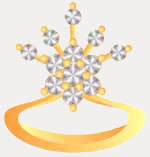
- Live demo of Ring 2
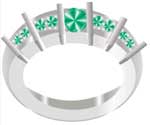
Phase V
- Miscellaneous design of Pendants using different settings
- Live demo of Pendant 1

Phase VI
- Miscellaneous design of Earings using different settings
- Live demo of Earing 1

Phase VII
- Miscellaneous designs of Bracelets using different settings
- Live demo 1

- Live demo 2

Phase VIII
- Miscellaneous design of Bangle using different settings

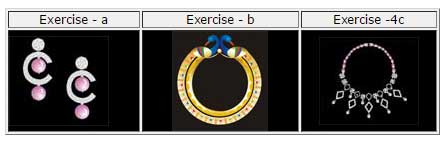
- Based on the above demos, please make the following exercises
Phase IX
- Live Demo 1 - Jewellery set including Necklace, Earings, Ring

- Live Demo 2 - Necklace
